Stories
Using a needle to open SIM tray? Know how it seriously damages your phone
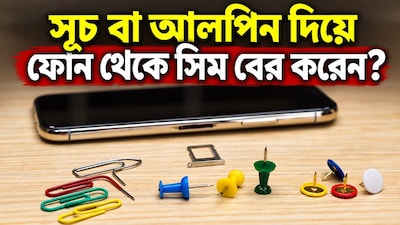
- •Using a sewing needle or straight pin to remove the SIM tray can damage the internal release mechanism.
- •Sharp objects can ruin the phone's waterproofing seal and damage nearby microphones, leading to costly repairs.
- •An excessively thin pin can break and get stuck inside the hole, requiring a visit to a service center.
- •Always use the specific SIM ejector pin provided in the phone box, as its flat and rounded head is designed for safety.
- •If the ejector pin is missing, a paper clip can be used cautiously, but avoid applying excessive force or using needles.
Key Questions Answered
Using a sharp object like a sewing needle or straight pin can destroy the phone's waterproofing seal, motherboard, and the internal spring-loaded lever mechanism that holds the SIM tray. It can also distort the lever, break and get stuck inside the hole, or damage the nearby microphone and rubber gasket.
Smartphones come with specifically sized and shaped SIM ejector pins whose tips are flat and rounded rather than sharp. Using the official tool ensures the pin makes correct contact with the release lever to push the tray out smoothly without causing structural damage or jolt.
If you cannot find the SIM ejector pin, you can use a stationery paper clip because its head is relatively thick and flat, reducing the risk of breaking inside. However, you should avoid using sewing needles, toothpicks, or stapler pins, and never force the tray if it does not come out.